How to install Linutop OS Free on a PC
- Installation with Imager balenaEtcher software and the .img or .iso image file:
The image of Linutop OS Free is available on our site at the following address: Linutop.com . You will need external storage (USB key, hard drive or a blank SD card).
Download balenaEtcher , available on Windows, MacOS and Linux. Install the software, insert your external storage, then diszipulate the file you downloaded from our Linutop site.
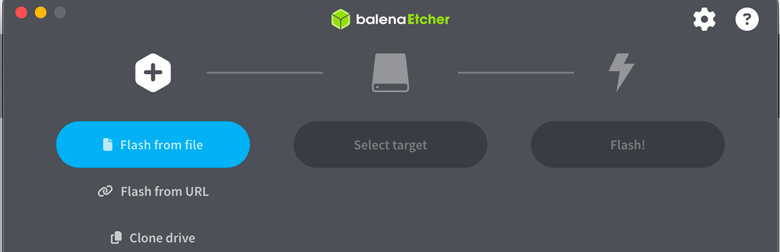


In balenaEtcher, select the image file , choose your external storage device, then click . Once the writing is finished, disconnect the storage and insert it into your Raspberry Pi to start with Linutop OS Free.
- Installation from Disk Imager with an image in .MG or .iso (Windows):
The USB or SD image must be written on a USB device or SD card.
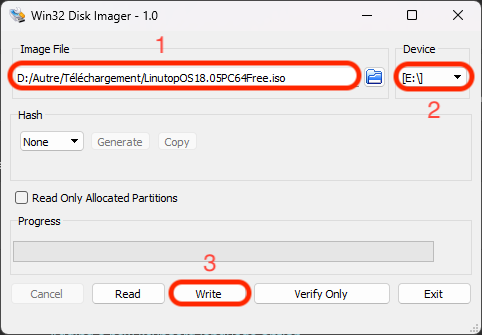
Under Windows™, download Disk Imager , or Rufus ,decompress and to run the software. Connect a USB key or SD card (1 GB min), select it And select the Linutop .img file. Click on the button .
- Installation from a virtual machine with an image in .ova or .iso:
: Download from VirtualBox , then download the .ova image from Linutop.com. Open the image in VirtualBox, which will automatically configure it and prepare it for installation.
: Download the .vmcz image from Linutop.com . This image is compatible with VMware. You can download VMware Workstation Player from VMware.com . Import the image into VMware Workstation or VMware Player, which will automatically configure the virtual machine and prepare it for installation.
: Example of installing the OS in a virtual machine (VM): Guide to installing a private Linutop TV server in a virtual machine
- How to configure the bios to boot Linutop OS:
To access the BIOS, the key is generally on .
In the BIOS, select to boot.
For more detail, consult the documentation of Ubuntu